The Hitchhikers Guide to LLM Agent

Figure 1. Manfred Mohr — P-197 Cubic Limit II (1979). Algorithmic art exploring systematic variations of the cube.
I spent the last few months building Hakken1, a coding agent from scratch. So in this blog I'm going to share what I learned; what actually matters when building agents that work great.
You might think there are lots of other coding agents which are absolutely the best, like Claude Code, Codex, and OpenCode. So why do we need another one? Tbh I just have this curious mind that just want to understand everything from scratch. So I built this agent out of curiosity. Some sections might be opinionated, but that's how I want to share it. Everything!
So, let's get started! Grab your Diet Coke and wipe away your tears if you're a Ferrari fan!
This blog is divided into following five important sections:- What is an LLM and Inference - Before getting into LLM Agent lets take a quick look into some fundamentals of LLMs.
- Context Engineering is Everything - The Most Important for building reliable agentic system.
- Evaluation: Build It First - We will explore how we can evaluate our agent.
- What About Memory? - We will explore why agents need memory, how to implement them and why it's overhyped.
-
The Subagent Pattern - We will see where using multiple agent is useful.
What is an LLM and Inference
Let's take a look into some fundamental concepts which I think these concepts are very important to understand if you are working with LLMs. I am just giving an overview but you should study more deeply about it.
What Is An LLM Agent?
In short, LLM agent is an LLM in a feedback loop with tools to interact with its environment. You can think of it like this; you give it a task in natural language and it breaks it down and then it calls tools to perform actions and then observes the result and keeps going until the task is done or model fucks up.
The core loop looks something like this: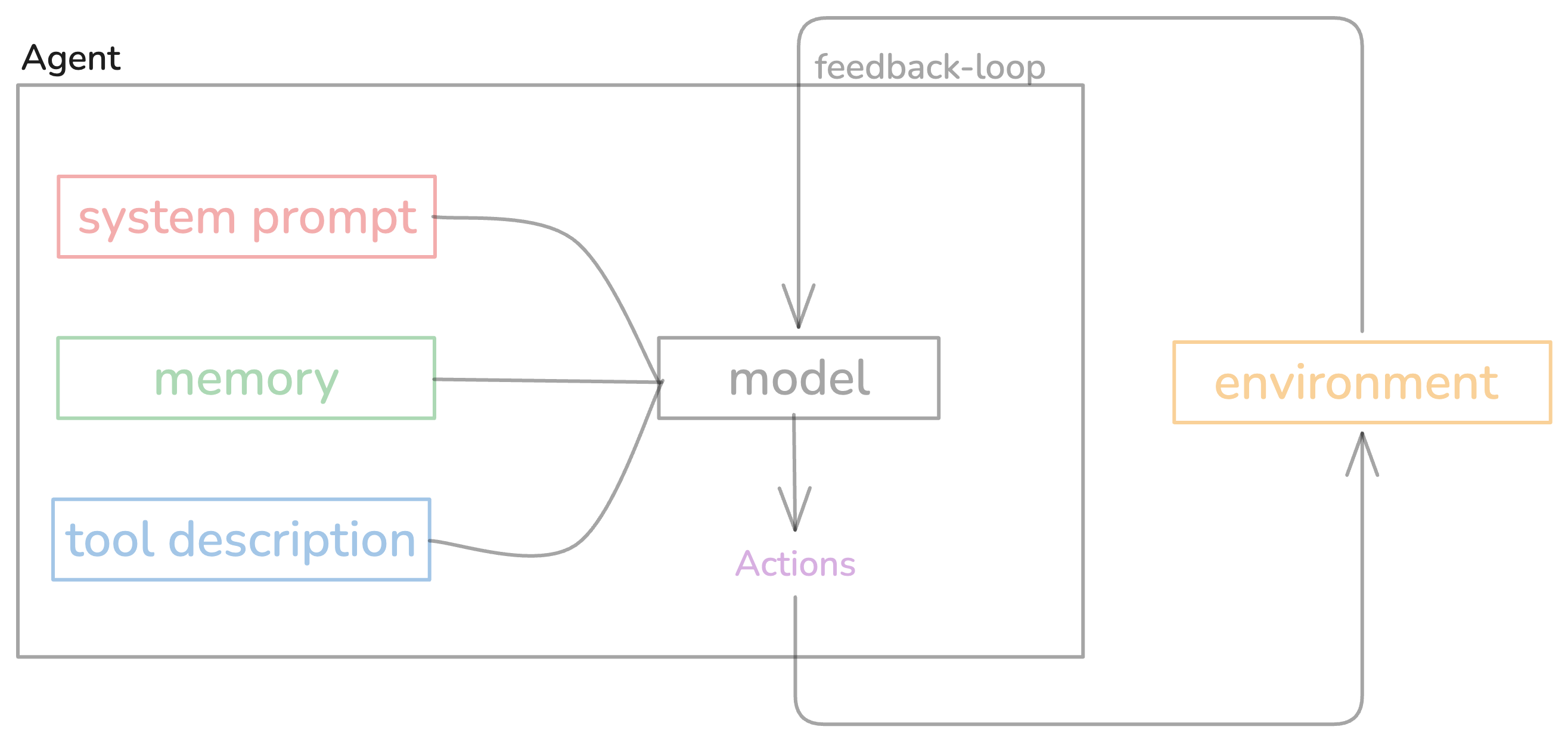
Figure 2. The core agent loop — observe, think, act, repeat until task completion or failure.
Agents should work autonomously; handling any length tasks without human interruption right? That's what agent means right?
But there is one problem: when given long-horizon tasks, it starts creating a mess at some point and then there is no going back from that. This is the biggest unsolved problem in agent land right now. Models are getting better, but they still can't handle 100+ step workflows reliably.
Does this mean they're completely useless for long-horizon tasks? No, they're not completely useless. With proper context management; you can use these models to build agents that can be useful for long-horizon tasks. I'll explain what context engineering is and why it matters. First let's see the basic Agent loop that makes all of this work.
Here's the simplest agent loop you can build:
async def agent_loop(task: str):
    messages = [
        {"role": "system", "content": SYSTEM_PROMPT},
        {"role": "user", "content": task}
    ]

    while True:
        response = await llm.chat(messages)
        messages.append({"role": "assistant", "content": response})

        # Check if model wants to use tools
        if response.tool_calls:
            for tool_call in response.tool_calls:
                result = await execute_tool(tool_call)
                messages.append({
                    "role": "tool",
                    "tool_call_id": tool_call.id,
                    "content": result
                })
        else:
            # No tool calls = task complete
            return response.content
That's it. Call LLM → check for tools → execute tools → repeat2. Every agent framework is just this loop with extra steps.
Why We Need LLM Agent?
Simple cause LLM is just a next word predictor; it doesn't know what to do next. It needs to be told what to do next. And that's where the agent comes in.
You can see in the following diagram how the LLM works.
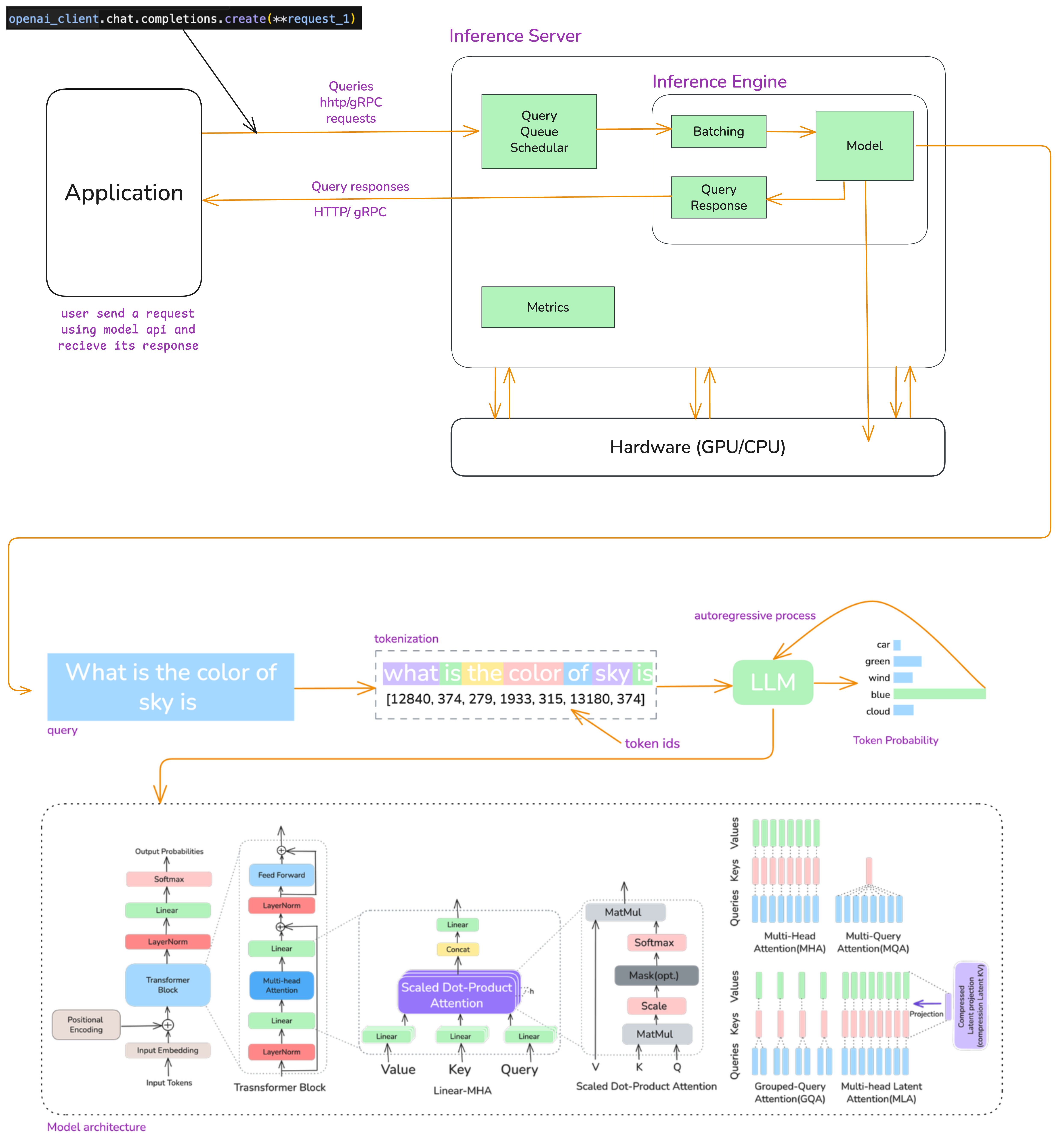
Figure 3. The complete LLM inference pipeline — from API call to token generation, showing prefill and decode phases.
Here's what actually happens when you call an LLM API:
Prefill Phase
You give prompt or input "what is the color of sky" to llm, first it get converted into numbers [12840, 374, 279, 1933, 315, 13180, 374] and then it get converted into embeddings and then processed through all transformer layers in parallel. After that model computes attention for all input tokens at once and outputs logits for the next token position.
All your input tokens get processed at the same time. If you have 1000 tokens in your prompt, all 1000 go through the model together. It's like batch processing.
So whether you send 100 or 1000 tokens, the GPU can process them in parallel using all its cores. We call this compute-bound because we're actually using the GPU's compute power efficiently.
Decode Phase
After Prefill phase the model start generating tokens one by one autoregressively this known as Decode Phase3. And each new tokens depends on all previous tokens. Here we use KV-cache4 to avoid recomputing everything. We store key/value matrices from previous tokens so you only need to process the new token. Without this, attention would be O(n²) for every single token. With it, it's O(n).
This phase is memory-bound - because each new token requires streaming the entire KV cache from memory with very little computation per byte and cause of autoregressive nature we cannot do parallelism.
Then sampling: softmax converts logits to probabilities and you pick the next token (greedy, top-k, temperature, whatever). Repeat until you hit max length or the <EOS> token.
Okay lets get back to the Agent.
In the age of LLMs and building AI Agents, it feels like we're still playing with raw HTML & CSS and figuring out how to fit these together to make a good experience. No single approach to building agents has become the standard yet, besides some of the absolute basics — Cognition.
AND I think everyone who's building AI agents should go through the 12-factor-agents repo by Dex5. He has done a great job explaining the architecture and principles to build reliable agents.
Okay as we said that the most important thing to building reliable agent is context engineering so let's see how to do it.
Context Engineering is Everything
Okay lets start with - What is context window? It's basically the input that you give to the LLM. That means system prompt, user prompt, tool description, history, memory, tool output, everything that you give LLM to generate good output.
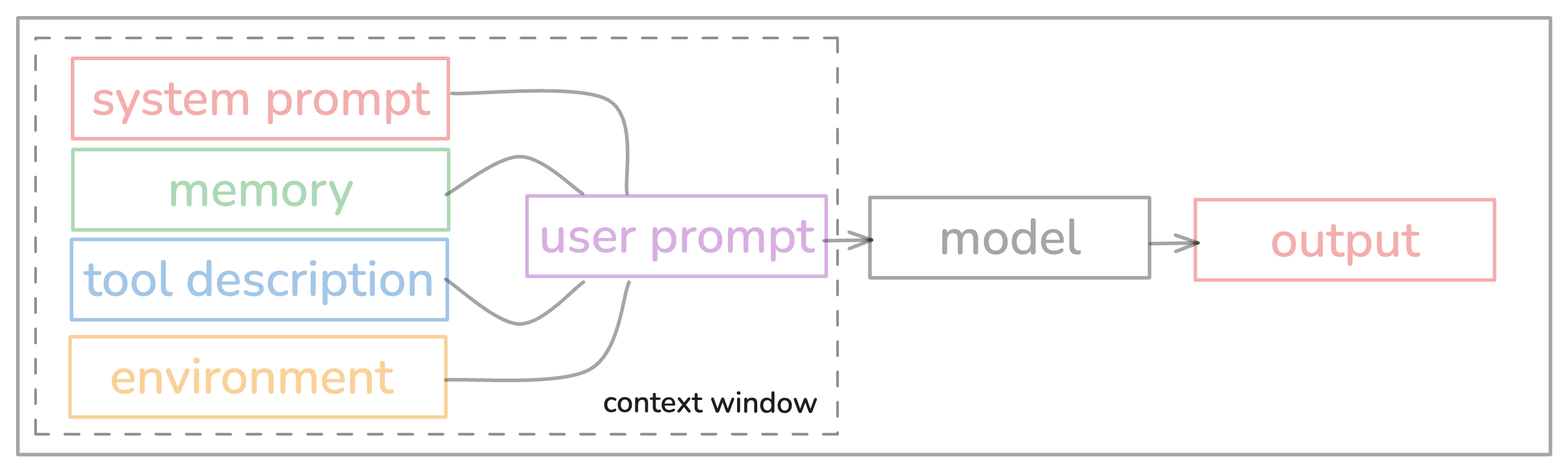
Figure 4. The context window — everything fed to the LLM including system prompt, user input, tool descriptions, and conversation history.
Context Window is like the space inside LLM agent you can think as RAM and It is limited. And using that space(context window) effectively means Context Engineering.
As you know that LLMs are just stateless functions right? You give them input, they give you output. That's it. To get good outputs, you need to give them good inputs. Sounds simple, right? But here's where it gets interesting.
You've probably seen the standard OpenAI message format:
[
  {"role": "system", "content": "You are..."},
  {"role": "user", "content": "Do something"},
  {"role": "assistant", "content": "..."},
  {"role": "tool", "content": "..."}
]
Which looks like this inside LLM Agent:
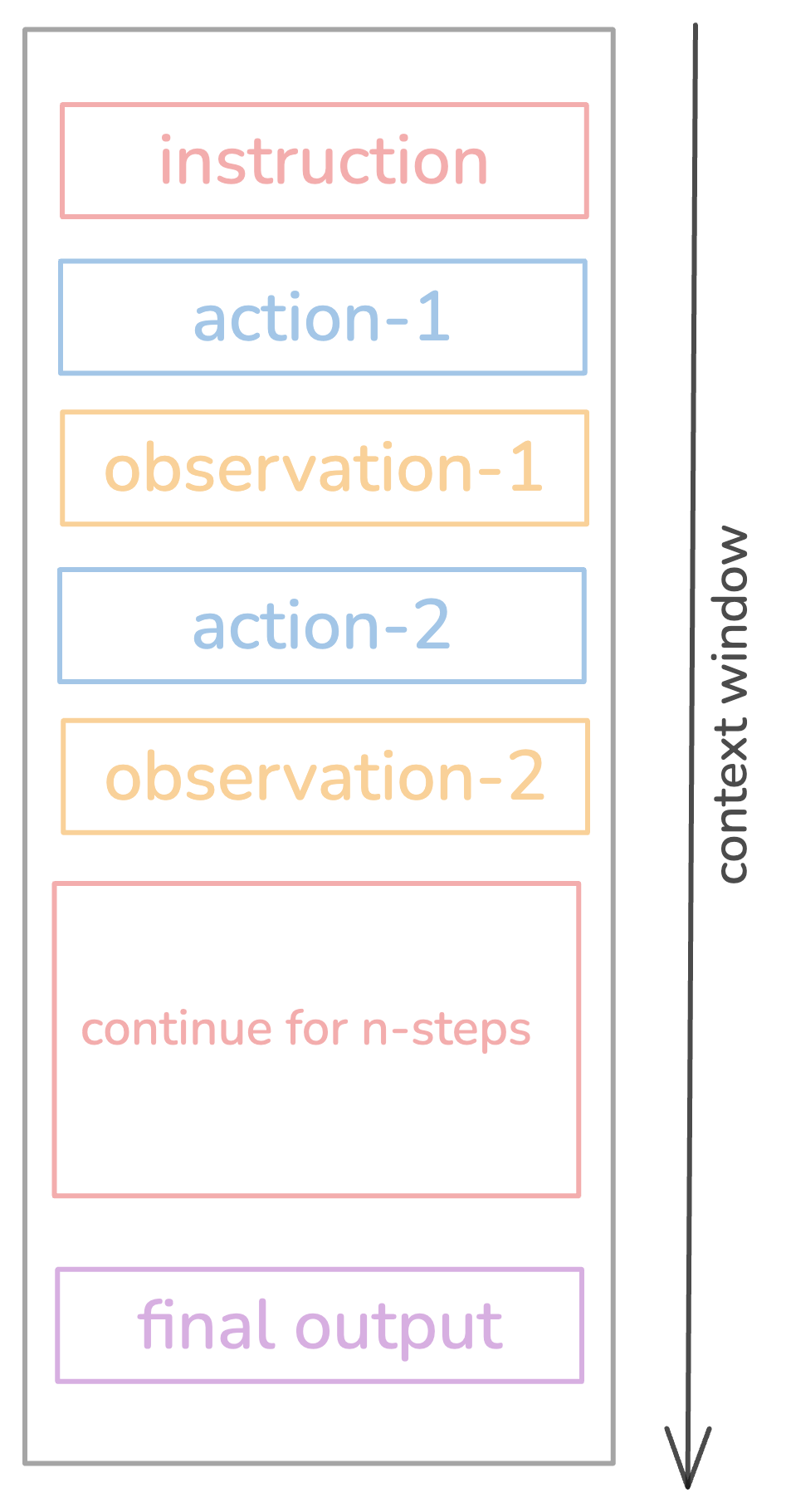
Figure 5. Message structure inside an LLM agent — system, user, assistant, and tool messages stacked in the context.
This works, sure. But is it optimal? Not at all and it will create noise cause not all information is important. You can pack information in a better way to avoid noise. The format is just a means to an end; what actually matters is giving the model the right information in a way it can use it.
Why should you even care about context management?
So here is thing that even models with 1M context windows get lost way before hitting their limit. Like, really way way before...
Means we have 150k to 200k context window length (in terms of tokens) to play where model can give its best performance so we need to use it very efficiently.
Okay, but WHY is this happening?
You can skip this part ; Its not important to learn about this.
To find the exact reason, we'd need to go deep into mechanistic interpretability7 of these models, which is way out of scope for this blog (and honestly, I don't fully understand it myself). But here's what I've learned from reading papers and building Hakken:
1. Error Compounding & Self-Conditioning
So imagine you're solving a long math problem and you make a tiny mistake in step 3. Now every step after that is fucked. Same thing with LLMs.
Research shows models become more likely to make mistakes when their context contains errors from prior turns. One wrong tool call early on? The model sees that mistake, gets confused, makes another mistake, sees that mistake... you get the idea. This is especially very bad for long-horizon tasks where early mistakes distort everything that comes after.
But this one is interesting because this is not a common thing if you're using models from Anthropic or OpenAI; they are very good at recovering from mistakes. But if you're using other cheaper models, then you might face this issue a lot8.
2. Lost-in-the-Middle Effect
LLMs have this U-shaped attention pattern - they pay attention to stuff at the beginning and end, but ignore the middle. It's like when you're in a meeting and only remember what was said at the start and at the end. Same thing here.
Chroma did this research on context rot9, they tested 18 different LLMs (GPT-4.1, Claude 4, Gemini 2.5, Qwen3) and found that performance consistently degrades as input length increases, even on simple tasks. They called it context rot.
Context rot means when your model's performance drops as you add more tokens. You'd think more context = better performance, right? Nope. Wrong.
Look at this experiment Chroma did:
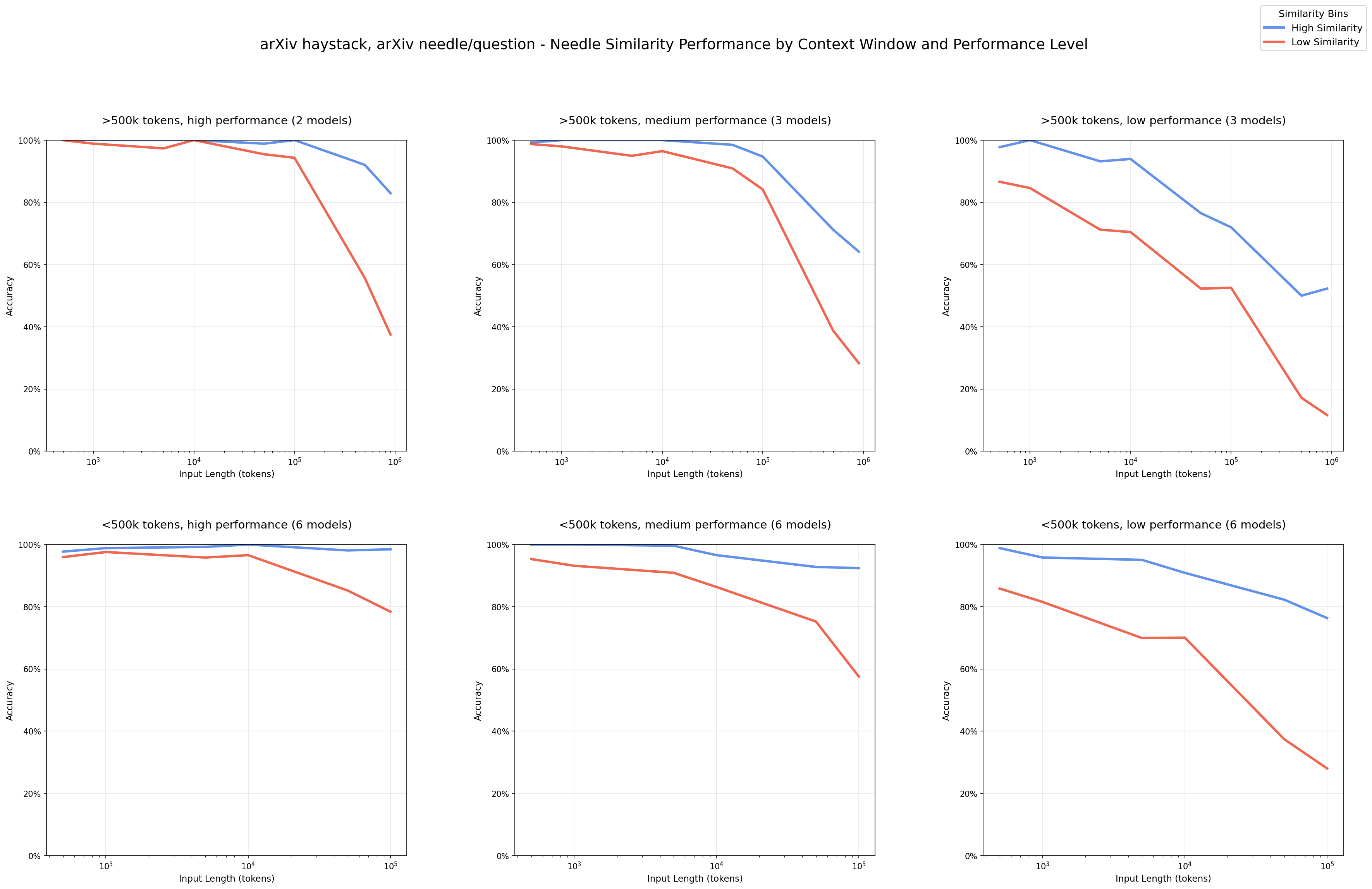
Figure 6. Performance degradation across 18 models (GPT-4.1, Claude 4, Gemini 2.5, Qwen3). Blue = high-similarity, Red = low-similarity needle-question pairs. Accuracy drops significantly as context grows.
Let's take a quick look into what's actually happening:
- Models perform worse at 100k tokens than 10k tokens10 - same exact task, just more irrelevant stuff around it. Look at that graph; performance dropped.
- Low similarity needle-question pairs tank at scale - when the question and answer aren't lexically similar, performance drops hard at longer contexts. That red line in the graph? Yeah, that's not good.
- Distractors have non-uniform impact - kinda related but wrong info confuses models more as context grows. Some distractors make it way worse than others.
- Structured text can actually cause problems - Models perform better on shuffled random text than coherent logical text. This suggests that coherent structure creates attention patterns that interfere with retrieval. Also cause model are great at mimicking.
Chroma's conclusion: "Even the most capable models are sensitive to how information is presented in context." And this isn't getting fixed by better models. GPT-5.1 and Claude 4 still suffer from this.
So it means it's not just about whether relevant information is present in your model's context. What matters more is what information you include and how you present it.
The takeaway? Your job is to pack the right information into 100k-200k tokens where models perform best. That's your sweet spot. And more importantly - keep your agent's context clean. Every error, every irrelevant tool output.
Many AI labs are working on solving long horizon problem with RL or some other memory kinda thing but these models are still incredibly useful - you just need to own every single token the model gets to see.
So yeah, context engineering is everything!
Lets see some context engineering example that I did in Hakken
1. Simple System Prompt
So here is the thing if you're working with cheaper or free model from openrouter then you're going to have very hard time.
WHY? Cause sometimes small and minimal prompt works and sometimes it doesn't. So I did not want to spend too much money on this project so I used those cheaper models with huge ass system prompt with all those xml tags and all that shit. I used to switch between cheaper model and cluade according to need.
But if you are working with good model like Claude Opus-4.5 you just give minimal system prompt and it will work fine.
For Example :
system_prompt = """
You are an expert coding assistant. You help users with coding tasks by reading files, executing commands, editing code, and writing new files.

Available tools:
- read: Read file contents
- bash: Execute bash commands
- edit: Make surgical edits to files
- write: Create or overwrite files

Guidelines:
- Use bash for file operations like ls, grep, find
- Use read to examine files before editing
- Use edit for precise changes (old text must match exactly)
- Use write only for new files or complete rewrites
- When summarizing your actions, output plain text directly - do NOT use cat or bash to display what you did
- Be concise in your responses
- Show file paths clearly when working with files

Documentation:
- Your own documentation (including custom model setup and theme creation) is at: /path/to/README.md
- Read it when users ask about features, configuration, or setup, and especially if the user asks you to add a custom model or provider, or create a custom theme.
2. Simple Tools Section
In the beginning I wanted all tools that this world has to offer. Cause I heard somewhere your agent is better if it has all tools to offer. But then I realized that's not the case. Cause most of the time you don't need all tools to offer. You only need the tools that are relevant to the task.
So I decided to give only the tools that are relevant to the task. And it worked fine.
You can let your agent use bash command for most of the tasks like for file operations like ls, grep, find. By doing this you can save huge number of tokens.
Hakken do not have web search tool. It used to have but it is not that useful. I think better way is to find the information by yourself that you think are important and save in .md docs and provide directly it to agent's context window.
3. Compression with Structure
When my context hits 80%, I summarize with an LLM. But I don't just free-form it - I use a schema to make sure I keep what matters:
def manage_context(self):
    if self.get_context_usage() >= 0.8:
        old_messages = self.messages[2:-5]

        summary_prompt = """Summarize preserving:
        - Key decisions made
        - Errors encountered and solutions
        - Pending todos
        Keep under 500 tokens."""

        summary = self.llm.generate(old_messages + [summary_prompt])

        self.messages = [
            self.messages[0],  # System prompt
            {"role": "assistant", "content": f"[Summary]\n{summary}"},
            *self.messages[-5:]  # Last 5 messages
        ]
Does this actually work? Yeah. Compression at 80% reduced my average context usage by 35-40%11. But you need to be careful about what to preserve - decisions, errors, and todos are critical.
Here you can use other cheaper model cause most of the models are good at summarisation task. And also this is not super important. I think it's better to start new session if it comes to stage of summarisation.
4. Aggressive Tool Result Management
Tool outputs are massive. Like, a file read can dump 1000 lines into your context. And sometimes not all of that is important. Here's what I do - I automatically clear old tool results after every 10 tool calls (keeping the last 5). Anthropic actually launched this as a platform feature12. It's that important.
def clear_old_tool_results(messages: list, keep_last: int = 5):
    """Clear tool results older than last N tool calls"""
    tool_indices = [
        i for i, msg in enumerate(messages)
        if msg.get("role") == "tool"
    ]

    if len(tool_indices) <= keep_last:
        return messages

    # Keep system prompt + user messages + last N tool results
    indices_to_clear = tool_indices[:-keep_last]

    for idx in indices_to_clear:
        messages[idx]["content"] = "[Result cleared - see recent outputs]"

    return messages

# Call this periodically in your agent loop
if tool_call_count % 10 == 0:
    messages = clear_old_tool_results(messages)
Why? Because once a tool has been called deep in history, why would the agent need to see the raw result again? You're not losing information, you're just cleaning up stuff that's not needed anymore.
5. KV-Cache Optimization
If you pick one metric for production agents, pick this: KV-cache hit rate - Manus13. Why? Because cached tokens on Sonnet-4.5 cost $0.30/MTok vs $3/MTok uncached. That's a 10x cost reduction right there and directly affect latency too.
But here's the thing - you need to follow three rules to actually make KV-cache work for you:
Keep your prompt prefix stable. If even one token changes in your prompt, the entire KV-cache from that point onward is invalidated. The model has to recompute everything after that token.
Here's what NOT to do:
system_prompt = f"""
Current time: {datetime.now().isoformat()}
You are a helpful assistant...
"""
Every single request gets a different timestamp → entire cache misses → you're paying full price for every request.
How prompt caching work overview
Request 1:
[System prompt: 10,000 tokens about coding guidelines]
User: "Write a function to sort an array"
→ Processes everything, caches the system prompt

Request 2 (minutes later):
[Same system prompt: 10,000 tokens]
User: "Write a function to reverse a string"
→ Retrieves cached system prompt instantly
→ Only processes the new user message
Make context append-only. Don't go back and modify previous messages in your context. The moment you edit something in the middle of your history, you break the cache from that point forward. Instead of updating old messages, append new information. Yes, this uses slightly more tokens. But it keeps your cache valid, which saves you way more in the long run.
Deterministic serialization. Many languages don't guarantee stable JSON key ordering. The same data might serialize differently across requests, which breaks caching. Always sort your JSON keys:
# Always sort keys to get consistent output
def serialize_for_cache(data):
    return json.dumps(data, sort_keys=True)
6. Structured Note-Taking
This is one of my favorite context optimizations. Instead of keeping everything in context, let the agent write notes to disk and retrieve them later.
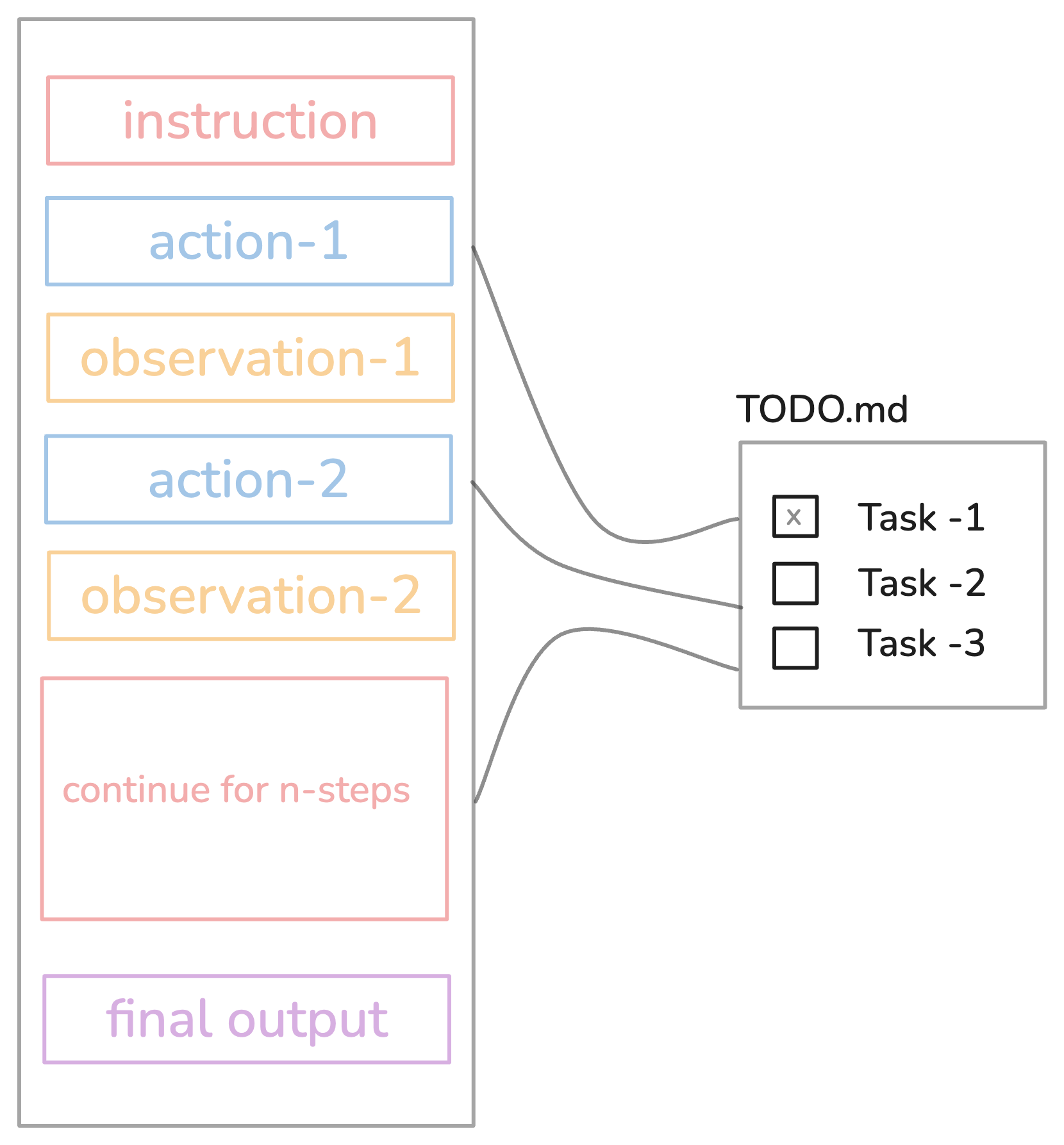
Figure 7. Structured note-taking in Hakken — the agent maintains a todo.md file to persist context outside the token window.
In Hakken, when tasks get complex, the agent creates a todo.md file and updates it as work progresses. This serves two purposes:
First, persistent memory - critical context lives outside the context window. No token limits here.
Second, attention manipulation - by constantly rewriting the todo list, the agent "recites" its objectives into the end of context, pushing goals into recent attention span. Remember that U-shaped attention pattern? This exploits it. The model keeps seeing its main goal at every turn of the conversation, so it doesn't forget what it's supposed to be doing.
In Some Tasks I found that agent work better without this in built todo tool. I think it breaks the flow of agent.
7. Progressive Disclosure
Don't pre-load everything. Use just-in-time retrieval. Instead of embedding everything and retrieving before inference, maintain lightweight identifiers (file paths, URLs, etc.) and dynamically load data at runtime using tools.
# Don't do this
context = load_all_docs() + load_all_files()

# Do this
context = {"file_paths": [...], "available_tools": [...]}
# Let agent explore and load what it needs
This actually mirrors human cognition pretty well. We don't memorize entire corpora, we use filing systems, inboxes, bookmarks to retrieve on demand.
8. Short Sessions, Not Long
Amp's research is clear on this: 200k tokens is plenty. Long threads they mess up, fall over, vomit all over you (okay maybe I'm exaggerating, but you get the point).
Break work into small threads. One task per thread. Use thread references to carry context forward:
# Thread 1: Basic implementation
# Thread 2: Refactor using read_thread(thread_1_id)
# Thread 3: Tests using read_thread(thread_2_id)
Each thread stays focused. Total work might use 1M tokens across threads, but each individual thread stays sharp under 200k.
Own Your Prompts and Control Flow
Alright, let's talk about something that drives me crazy. I see so many frameworks where you do something like this:
agent = Agent(role="...", goal="...", personality="...")
Figure 8. From Hamel Husain's blog on prompt ownership — many frameworks hide what actually gets sent to the model.
And you have no idea what tokens are actually going to the model. Maybe it's great prompt engineering, or maybe it's sending some bullshit system prompt that you can't control or even see. You won't know until your agent starts giving you random stuff and then you'll realize you have zero control.
Not only that, but extracting the final prompt that gets sent to the model from those frameworks is way too hard.
In Hakken, I own every single token that goes into the context window:
def get_system_prompt():
    """
    You are Hakken, an autonomous coding agent.

    Core behaviors:
    - Read files before editing
    - Write clean, idiomatic code
    - Explain your reasoning

    Available tools: [list with descriptions]
    Constraints: [safety rules]
    """
Is my prompt perfect? Fuck no14. But I can iterate on it easily because I know exactly what the model is seeing.
When something breaks, it's easy to debug. I can change how the model should act. The benefit here is full control.
Same thing with control flow. Own your loop. Most agent frameworks give you this black-box loop where you feed in your task and hope it works. Build your own loop that you actually understand and can modify when shit goes sideways:
async def _recursive_message_handling(self):
    # 1. Compress context if needed
    self._history_manager.auto_messages_compression()

    # 2. Call LLM
    request = self._build_api_request()
    stream = self._api_client.get_completion_stream(request)
    response = self._response_handler.process_stream(stream)

    # 3. Add to history
    self.add_message(response)

    # 4. Tool calls? Execute and recurse
    if has_tool_calls(response):
        await self._tool_executor.handle_tool_calls(response.tool_calls)
        await self._recursive_message_handling()  # Loop again
    else:
        await self._handle_conversation_turn(response)
Why own the loop? So you can break out when shit happens:
if tool.is_dangerous():
    approval = await ask_human(f"Agent wants to {tool.name}. Allow?")
    if not approval:
        return "Task cancelled"
Can't do this if a framework owns your control flow. TBH it's not hard to build, it's just a recursive loop.
I added this
ask user before using toolbecuase I was working with cheaper model But I think You don't need this if working with models like Opus-4.5. You can just mentioned your security stuff in system prompt.
Running Agent On Trust Mode
So I have given all the permission to hakken agent at the start with like asking permission to run this and run or ask question. But when I gave complete permission it started giving me better results. Idk is this a thing or not but yeah this is what I observed.
Then to find out the reason and it was simple reason: that is it breaks the thinking process and when agent sees that it can ask for permission it behaves like it has less confidence in it.
So basically when you keep asking agent for permission every single step, it loses the context and has to restart its thinking chain again and again. It's like trying to solve a puzzle but someone keeps interrupting you after every piece - you lose track of the bigger picture.
Also I noticed that when agent knows it has full permission upfront, it plans better. Like it can think multiple steps ahead instead of just focusing on one step at a time. It's more strategic about the whole goal instead of being stuck in permission-asking loop.
The downside is obviously you lose some control and oversight. But for complex tasks where you trust the agent, giving blanket permission upfront just works way better. It's similar to how you'd work with a human assistant - if you trust them, you give them authority to make decisions instead of micromanaging every small thing.
Note : This work really great with Claude Opus 4.5.
Evaluation: Build It First
Okay, so agent eval is not like normal LLM eval. Agents are complex cause they reason, use tools, make plans, work across multiple turns.
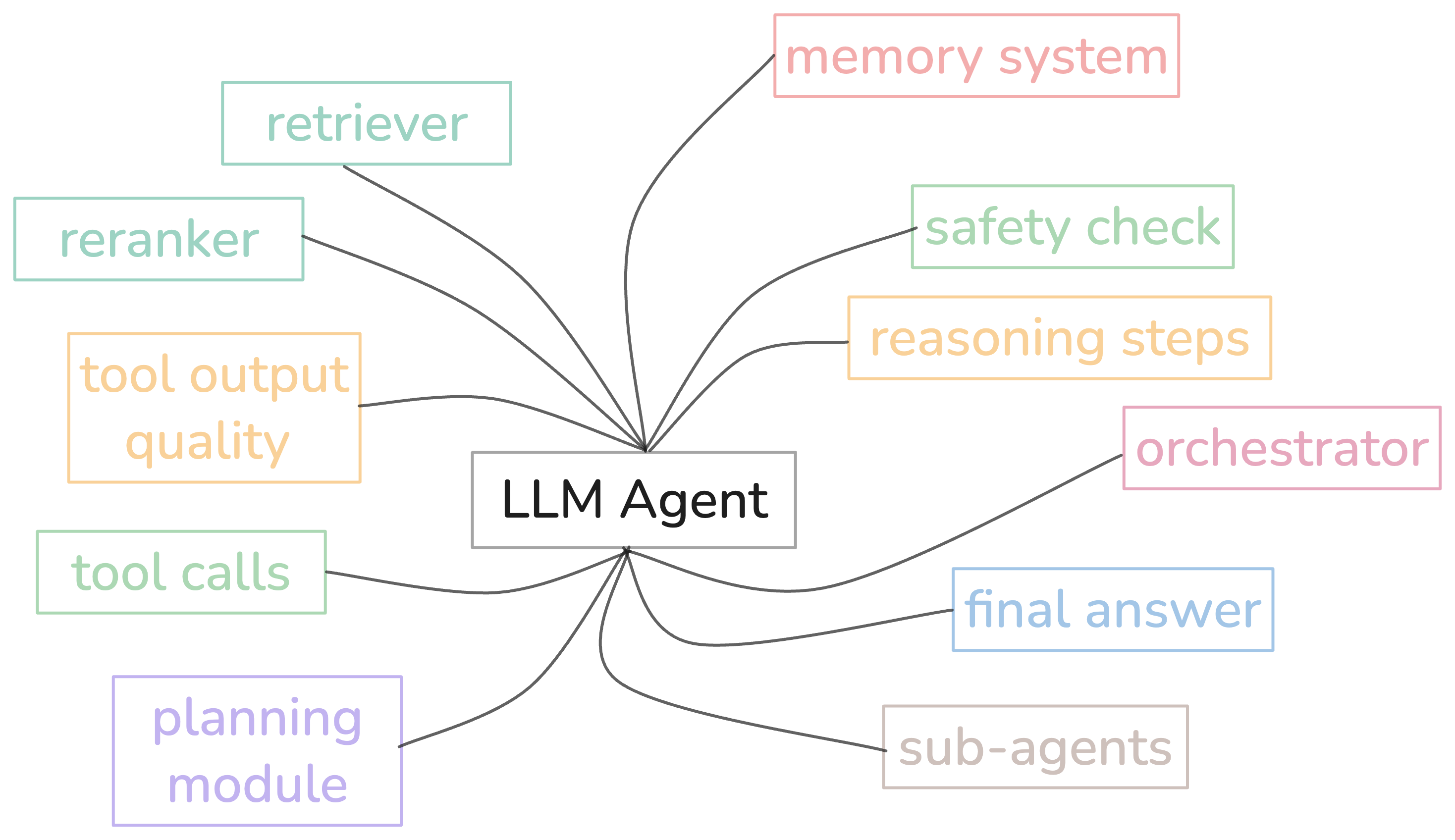
Figure 9. Complex Evaluation of LLM Agent — the agent have so many components and you need to evaluate separately.
You know traditional testing expects same input → same output but agents are non-deterministic right? Cause they operate across multi-step workflows, make real API calls, and maintain context.
So you need completely different approach. You need to break down the components of the agents and test it separately. I started with very simple evals like first save all traces of of your agent. And just note down failure and add it your eval datasets.
Components That Need Evaluation
-
Retriever(s) - Are they pulling relevant docs? (Contextual Relevancy)
-
Reranker - Is it reordering results correctly? (Ranking quality)
-
LLM - Is the output relevant and faithful? (Answer Relevancy, Faithfulness)
-
Tool Calls - Right tools? Right params? Efficient? (Tool Correctness, Tool Efficiency)
-
Planning Module - Is the plan logical and complete? (Plan Quality)
-
Reasoning Steps - Is the thinking coherent and relevant? (Reasoning Quality)
-
Sub-agents - Are they completing their subtasks? (Task Completion per agent)
-
Router/Orchestrator - Is it routing to the right component? (Routing Accuracy)
-
Memory System - Is it storing/retrieving relevant info? (Memory Relevancy)
-
Final Answer - Did it complete the task? (Task Completion via G-Eval)
-
Safety Check - Any toxic/biased/harmful content? (Safety Metrics)
-
Full Pipeline - Did the entire agent workflow succeed? (Overall Task Completion)
And also one thing I tried is building monitoring UI where you can monitor all the agent traces with all events. And also monitor cost and latency which becomes useful to spot the failure of your agent and add those data to your evals.
Use LLM for most of the evals cause this is complex task so binary metrics would not give you much result.
Evaluation section is kinda weak cause personally I built Hakken just for fun toy project. So I did not care about benchmarks. I was like as long as it works, it works.
What About Memory?
Let's understand first why we need memory. Simply, we know that LLMs are stateless; they don't remember anything.
So every new conversation you start with LLM is from scratch.
Suppose you're starting new session want to continue old task then you need to give complete context of old incomplete task to the model.
Okay you get the point right? That agent does not remember any stuff.
Suppose you are working on a coding problem and you want your output in a specific format every time you perform a coding task with an agent. So what can you do here? You can mention how you want your output every time you give input. But what if the agent could figure out your preferred format and remember it? That's where you need Memory.
You will see so many people talking about memory this and memory that. The most important thing to build a reliable agent is context engineering. That's it.
Okay then memory is not needed? It's needed but not everywhere. Let me explain with examples.
When Memory is NOT Needed (Horizontal Applications)
Think about ChatGPT or Claude or any general purpose chatbot. Every conversation is different right? Today someone asks about cooking recipes, tomorrow someone asks about fixing their car, next person asks about math problems.
What's the point of remembering stuff here? Each conversation is fresh, new context, new problem. You just need good prompts and proper context in that moment. That's why you don't see ChatGPT remembering "oh last time this user liked short answers so let me give short answers every time". It doesn't make sense.
Same thing if you building customer support bot for different types of queries, or building general Q&A system. Memory just adds complexity for no reason. Good context engineering in that moment is enough.
When Memory IS Needed (Vertical Applications)
But now think about coding agent. You are working on the same codebase for weeks or months. The agent should remember your style preferences right? Like you told it once "hey don't write too many comments, follow clean code guidelines, don't add unnecessary error handling everywhere, keep functions small".
Without memory, you will keep repeating same thing again and again in every conversation. That's annoying. Here memory is goldmine because the domain is same, the task is specific, the context is related.
Another example - let's say you're building a personal finance agent. It should remember "user wants aggressive investment strategy" or "user has low risk tolerance" or "user prefers index funds". Because every conversation is about the same thing - their money, their portfolio. Memory makes sense here.
Or think about email writing agent for sales team. It should remember company tone, writing style, what kind of emails convert better, etc. Because it's doing the same task again and again.
Conclusion: when building vertical LLM application for solving very specific task then memory might be useful. Like coding agents, personal assistants, specialized tools etc. But if you are building horizontal LLM application where every query is different then it's good to have but not a must. Focus on context engineering first, add memory only if it actually solves a real problem.
Here's a simple memory implementation for a coding agent:
import json
from pathlib import Path

class AgentMemory:
    def __init__(self, memory_file: str = ".hakken/memory.json"):
        self.memory_file = Path(memory_file)
        self.memory = self._load()

    def _load(self) -> dict:
        if self.memory_file.exists():
            return json.loads(self.memory_file.read_text())
        return {"preferences": {}, "learnings": []}

    def save(self):
        self.memory_file.parent.mkdir(exist_ok=True)
        self.memory_file.write_text(json.dumps(self.memory, indent=2))

    def add_preference(self, key: str, value: str):
        """Store user preferences like coding style"""
        self.memory["preferences"][key] = value
        self.save()

    def add_learning(self, learning: str):
        """Store things agent learned about the codebase"""
        self.memory["learnings"].append(learning)
        self.save()

    def get_context(self) -> str:
        """Format memory for injection into system prompt"""
        if not self.memory["preferences"] and not self.memory["learnings"]:
            return ""

        context = "\n## User Preferences (from past sessions)\n"
        for key, value in self.memory["preferences"].items():
            context += f"- {key}: {value}\n"

        if self.memory["learnings"]:
            context += "\n## Codebase Knowledge\n"
            for learning in self.memory["learnings"][-10:]:  # Last 10
                context += f"- {learning}\n"

        return context

# Usage in agent
memory = AgentMemory()
system_prompt = BASE_PROMPT + memory.get_context()
Simple file-based storage. No vector DB needed for most use cases. The key is knowing when to store something - I trigger memory updates when the agent detects explicit preferences ("always use type hints") or learns something about the codebase structure.
The Subagent Pattern
Subagents are very useful. They can help you reduce the context window load from the main agent by completing tasks in isolated context window.
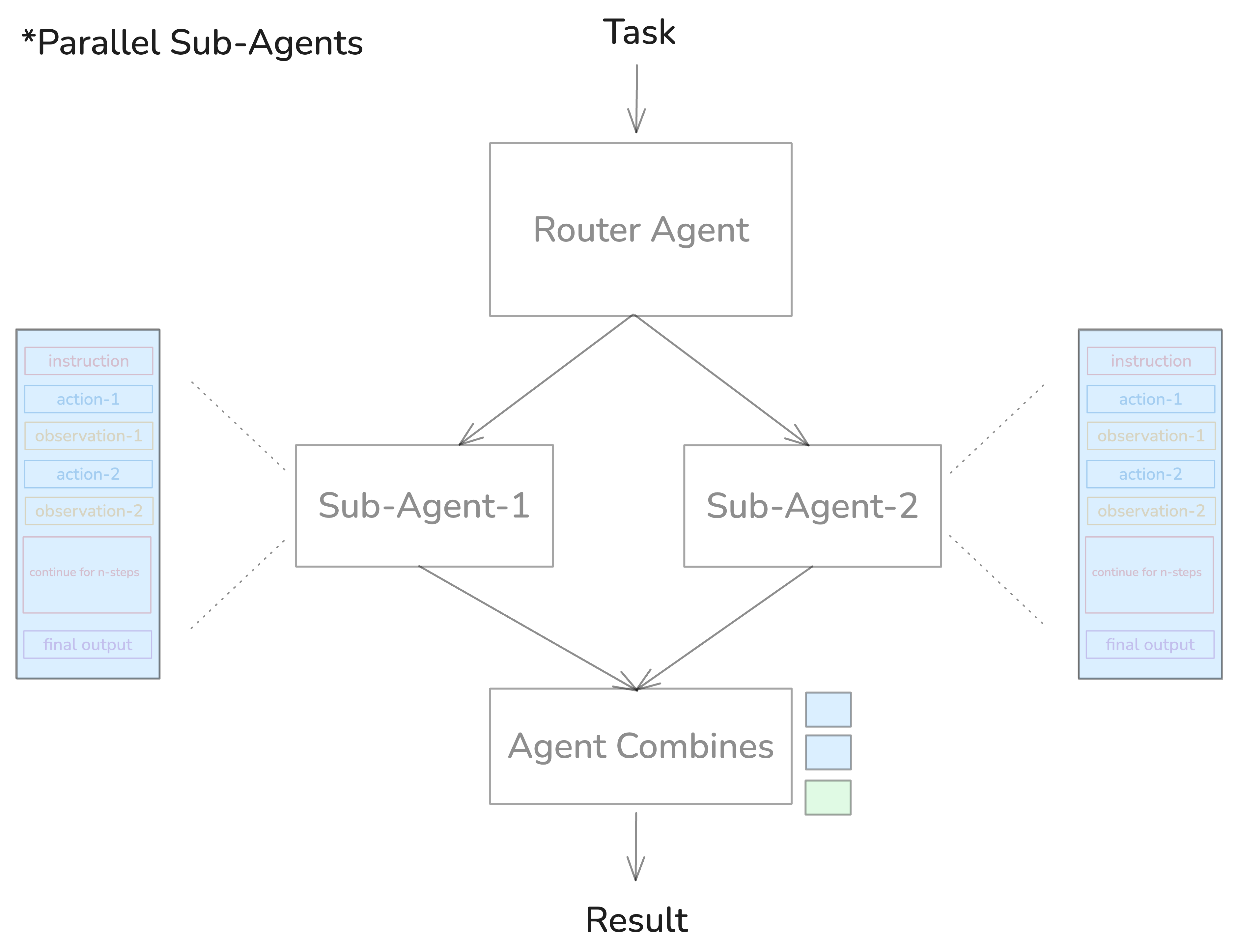
Figure 10. Parallel interdependent tasks in subagents.
In Hakken, I have general-purpose, code-review, test-writer, and refactor subagents. Each one has its own specialized prompt.
Here's a simple subagent pattern:
class SubAgent:
    def __init__(self, name: str, system_prompt: str):
        self.name = name
        self.system_prompt = system_prompt
        self.messages = []  # Fresh context for each subagent

    async def run(self, task: str) -> str:
        """Run task in isolated context"""
        self.messages = [
            {"role": "system", "content": self.system_prompt},
            {"role": "user", "content": task}
        ]
        return await agent_loop(self.messages)

# Define specialized subagents
code_reviewer = SubAgent(
    name="code-review",
    system_prompt="""You are a code reviewer.
    Focus on: bugs, security issues, performance.
    Output format: JSON with issues array."""
)

test_writer = SubAgent(
    name="test-writer",
    system_prompt="""You are a test writer.
    Write comprehensive unit tests.
    Use pytest. Cover edge cases."""
)

# Main agent delegates to subagents
async def main_agent(task: str):
    if "review" in task.lower():
        return await code_reviewer.run(task)
    elif "test" in task.lower():
        return await test_writer.run(task)
    else:
        return await general_agent.run(task)
When subagents DON'T work: Parallel interdependent tasks. If your main agent is building a game engine while a subagent is designing a bird sprite, integration fails; they don't communicate with each other during the work.
There are ways to use subagent for the same task by sharing the context between main and subagent which I think is too complex and can degrade the agent performance. So I believe in keeping it simple.
Use subagents for deep research (parallel exploration), code review (non-interdependent), and sequential tasks (one completes, next starts with results).
The Simple Stuff That Matters
Let me share a few simple patterns that make a real difference:
Compact Errors
Tools fail constantly. You need to add errors to context so the LLM can see what broke, but full stack traces are massive:
def _compact_error(self, error: str) -> str:
    if len(error) <= 800:
        return error

    lines = error.strip().split('\n')
    if len(lines) <= 6:
        return error[:800]

    head = '\n'.join(lines[:2])
    tail = '\n'.join(lines[-3:])
    omitted = len(lines) - 5
    return f"{head}\n[...{omitted} lines omitted...]\n{tail}"
And track consecutive errors. If the agent fails 3 times in a row on the same thing, break out - it clearly can't fix it.
Skills > MCPs
MCPs (Model Context Protocol) consume tens of thousands of tokens. Instead, You use Skills - they're just Markdown files with YAML metadata. Super simple:
---
name: pdf-creator
description: Creates PDFs from markdown
applies_when: User requests PDF output
---

# PDF Creation Skill

To create a PDF:
1. Use markdown-pdf library
2. Validate output with check_pdf_size()
3. Save to /mnt/outputs/
Models can read the skill metadata (few dozen tokens), then load full details only when needed. Progressive disclosure keeps context clean.
What Tech Stack To Use
Before building Hakken I went through some repos like OpenCode and Codex just to understand what they are using to build this. So Codex used Rust to build their agent and OpenCode uses TypeScript.
There are benefits of using both but I think it's better to stick with what you know. The first version I built of Hakken was using Python for both frontend and backend.
For frontend I used Rich but soon enough I realized you cannot do much with Rich. Then I decided to build with Ink (React for terminal) so here you can do so much stuff. So I built every fancy thing that I could. But then it started flickering cause so many components and my poor frontend skills.
Now I believe keeping it simple makes more sense. Cause we are working in terminal.
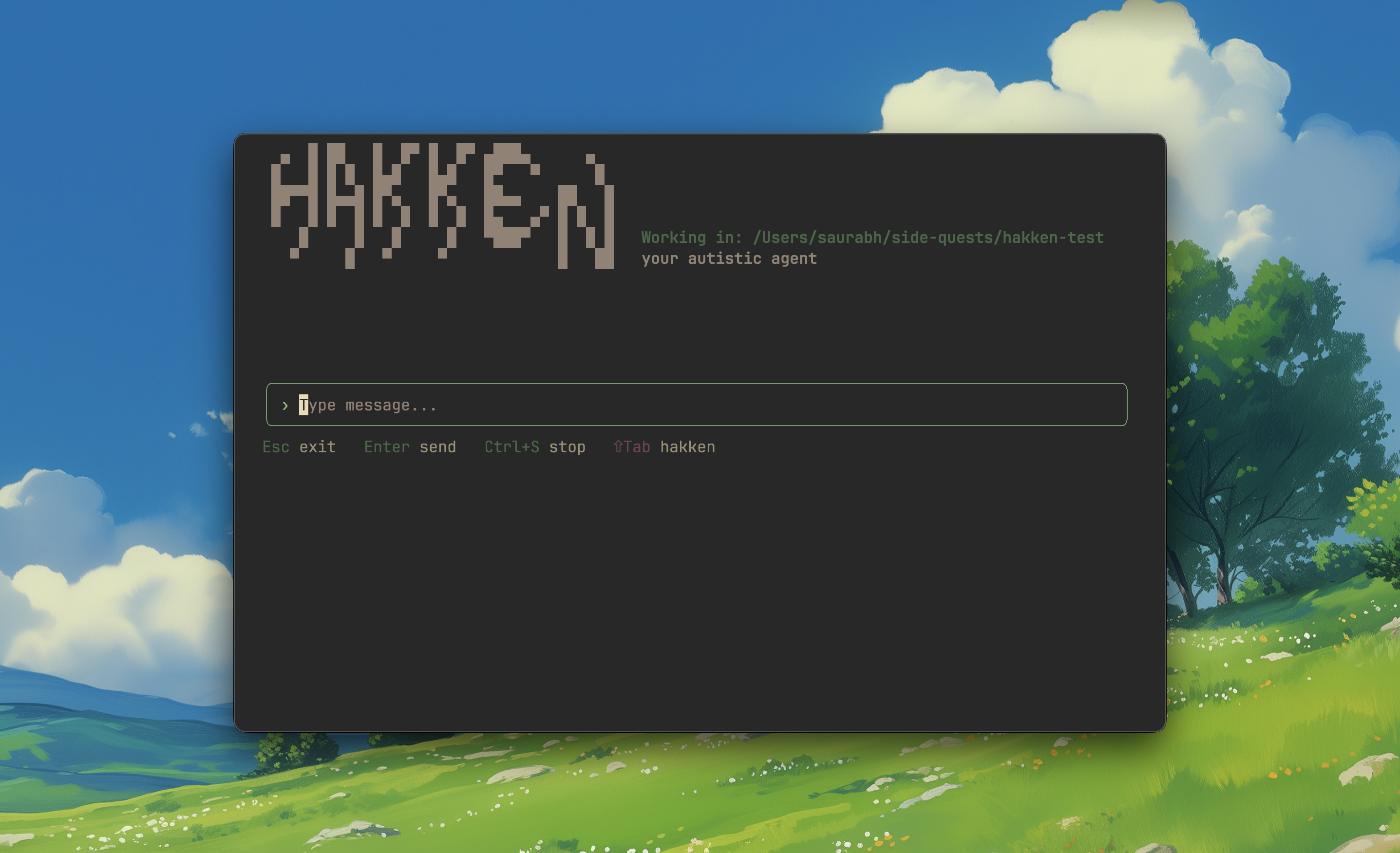
Figure 11. Hakken terminal agent in action — showcasing the clean CLI interface(kinda clean hehe).
Some Important Decisions When Building Terminal Agents
You can see that terminal-based AI agents have become standard for software development workflows(it great cause I moslty used terminal) and there are some critical things to get right:
TUI vs Simple CLI - You gotta decide early if you want a full TUI (Terminal User Interface) or just a simple CLI. Most big tech companies like Anthropic and Google released terminal agents that had glitchy interfaces, but tools built with proper frameworks like Textual or BubbleTea are way smoother.
Output Display - Think about what you want to show on terminal. Do you stream full output of tools? Do you show everything or just summaries? Modern terminal agents support features like Markdown rendering, syntax highlighting, and tables instead of plain text.
Scrolling and Navigation - This is huge. Users need to scroll through long outputs, search through responses, and navigate smoothly. Bad scrolling = bad experience.
What Actually Matters
After building Hakken from scratch, here's my hierarchy of what matters:
1. Context Engineering - Master this or everything else fails. Keep context tight and relevant. Use compression, tool result clearing, note-taking. Optimize KV-cache hit rates. Break work into short focused sessions under 200k tokens.
2. Evaluation - Build evals first, iterate with data. Start with unit tests for tools. Add model-based eval for scale. Use probe-based testing for context quality. The difference between a demo and a product is evaluation.
3. Own Your Stack - Don't outsource to frameworks. Own your prompts - know every token that goes to the model. Own your control flow - handle edge cases when shit breaks. Own your context - decide what stays and goes.
4. Simple Patterns - Use what works. Subagents for complex tasks. Skills over MCPs for extensibility. Structured note-taking for memory. Progressive disclosure for context. Don't over-engineer.
5. Memory - Only if you actually need it. Vertical apps (coding, finance) = useful. Horizontal apps (ChatGPT-style) = focus on context engineering instead.
Wrap Up
Look, building agents is still experimental science. These patterns work today but might change tomorrow. The field is moving fast. Stay flexible and iterate fast.
Thanks for reading this far! and Happy New Year !!
Building Hakken was a great learning experience. And it's not still perfect but I learned a lot.
Find me on GitHub and Twitter, or buy me a coffee if this helped.
Next I am working CUDA, LLM Inference, Fine Tuning and Reading more paper on long running agent and RL for context folding in 2026.
Catch you later!